Quick answer
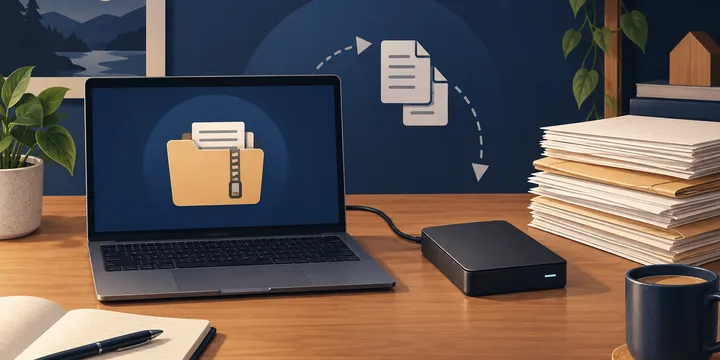
Install BorgBackup, initialize an encrypted repository on a separate disk, create a dated archive from your document folder, list the archive, and restore a small test file. Keep the repository and its key safe, use the same Linux user for routine access, prune only after understanding retention, and keep another backup copy because one local disk is not a complete backup strategy.
If your searchable document archive lives on a Linux computer, BorgBackup can make repeatable snapshots without copying unchanged data into every archive. This guide is for a household archive stored in a folder such as ~/Documents/Archive, with a repository on a separate local disk. It does not replace an off-site copy, and it does not cover live databases or virtual-machine images.
Before you start
Use a separate disk or mounted storage for the repository. A second directory on the same disk protects against accidental deletion, but not disk failure. Confirm that the destination is mounted and that you have enough free space. Keep the repository path separate from the source folder so a broad backup command cannot back up its own output.
Install Borg from your distribution’s supported packages. On Debian or Ubuntu, the package is commonly named borgbackup; on another distribution, use its current package documentation. Check the installed command:
borg --versionThe examples below use these placeholders:
Source archive: /home/you/Documents/Archive
Repository:     /media/you/BackupDisk/borg/document-archive
Replace them with your real paths. Do not paste a passphrase into shell history.
Initialize an encrypted repository
Create the destination directory and initialize it once:
mkdir -p /media/you/BackupDisk/borg/document-archive
borg init --encryption=repokey /media/you/BackupDisk/borg/document-archive
Borg prompts for a passphrase. Choose one you can recover safely. An encrypted repository is useless to you if the key or passphrase is lost, so protect the key according to Borg’s current guidance and store recovery material separately from the backup disk. Do not put it in the document archive you are backing up.
For a household archive, running routine commands as the same Linux user is usually the least surprising arrangement. Mixing users can cause cache and permission problems. If the archive contains files owned by multiple users, design that permission model first; do not casually add sudo to every command.
Create the first document snapshot
Create an archive with a readable name. Borg stores a snapshot inside the repository; the repository path comes before the :: separator and the archive name follows it.
borg create --stats \
  /media/you/BackupDisk/borg/document-archive::documents-{now} \
  /home/you/Documents/Archive
The {now} placeholder is expanded by Borg. The first run may take time because it reads every selected file. For a document archive, include PDFs, scans, office files and any sidecar metadata that your search system needs. Exclude caches or temporary working folders deliberately. If a file is changing while Borg reads it, the saved state may not be internally consistent; close the application that edits the archive before running the backup.
Verify that the archive is usable
A successful exit code is useful, but it is not a restore test. First list archives and inspect the newest one:
borg list /media/you/BackupDisk/borg/document-archive
borg list /media/you/BackupDisk/borg/document-archive::ARCHIVE_NAME
Use the exact archive name printed by the first command. Select one small, non-sensitive file for a test restore. Restore into an empty temporary directory, not over your live archive:
mkdir -p /tmp/document-archive-restore-test
cd /tmp/document-archive-restore-test
borg extract /media/you/BackupDisk/borg/document-archive::ARCHIVE_NAME \
  home/you/Documents/Archive/example.pdf
The path passed to borg extract is the path recorded inside the archive, so inspect borg list first. Open the restored copy and confirm its filename and contents. This proves that you know the archive name, path layout, key and passphrase before an emergency.
Choose a practical repeat schedule
For a household archive, a daily or weekly snapshot may be enough. Keep several recent archives, but do not write a retention policy you have not understood. Borg’s prune removes archives according to rules, and compact can reclaim repository space after deletion.
| Need | Sensible starting point | Check before adopting it |
|---|---|---|
| Occasional scans and receipts | Weekly archive | Can you recreate a week of changes? |
| Daily household paperwork | Daily archive plus monthly retention | Is the backup disk mounted at run time? |
| Important records | Daily local archive plus another copy | Can you restore if the local disk is lost? |
Test the schedule manually first. If you automate it, protect the passphrase and make failures visible. An unattended command that silently stops is not dependable.
Troubleshoot common failures
If Borg reports that the repository cannot be found, check that the backup disk is mounted at the expected path. If it reports permission denied, check the user, mount options and ownership before using elevated privileges. If the repository is full, do not delete archives at random: inspect retention and keep another copy before changing policy.
If a restore fails because the passphrase or key is unavailable, the repository may be unrecoverable. This is why key recovery belongs in initial setup. If a file is missing, list the archive and confirm that the source path was included; Borg cannot restore a folder it never received.
What this setup does not protect against
A repository on one external disk is vulnerable to theft, fire, failure and accidental deletion. Keep a second copy in a different place, and periodically perform a restore test from that copy. Borg’s encryption protects repository contents, but it does not create a second location automatically. Treat the local repository as one layer in a backup plan.
For related file-storage context, see the site’s guides to using Google Drive and using Google Docs; those are separate storage options, not substitutes for a tested Borg restore.
Sources and limitations
The command model and safety limits come from the Borg quick-start documentation. The BorgBackup project is the authoritative place to check current releases and command details. Community explanations can help with concepts, but always check current documentation before automating an encrypted repository.
The safest milestone is small: initialize the repository, create one archive, list it, and restore one test file. Once that works, document the paths, schedule and recovery materials for the household.